
반응형
250x250
Notice
Recent Posts
Recent Comments
Link
| 일 | 월 | 화 | 수 | 목 | 금 | 토 |
|---|---|---|---|---|---|---|
| 1 | 2 | 3 | 4 | |||
| 5 | 6 | 7 | 8 | 9 | 10 | 11 |
| 12 | 13 | 14 | 15 | 16 | 17 | 18 |
| 19 | 20 | 21 | 22 | 23 | 24 | 25 |
| 26 | 27 | 28 | 29 | 30 |
Tags
- 이클립스설치
- 자바스크립트
- 자바기초
- 개발공부
- mysql오류
- insert
- equals()
- Eclipse
- 청년희망적금미리보기
- 이클립스
- 자바스크립트배열
- ToString()
- 공부
- 청년희망적금
- StringBuffer
- 저축장려금
- apachetomcat
- Java
- 참조변수
- MySQL
- 청년적금
- if문
- 자바문자열연결
- 신한은행청년희망적금
- 자바
- 자바배열
- 자바강의노트
- 배열함수
- 2022청년희망적금
- 자바공부
Archives
- Today
- Total
eterno
JAVA 14일차. 복습 및 문제풀어보기 본문
728x90
반응형

switch문 복습 예제)
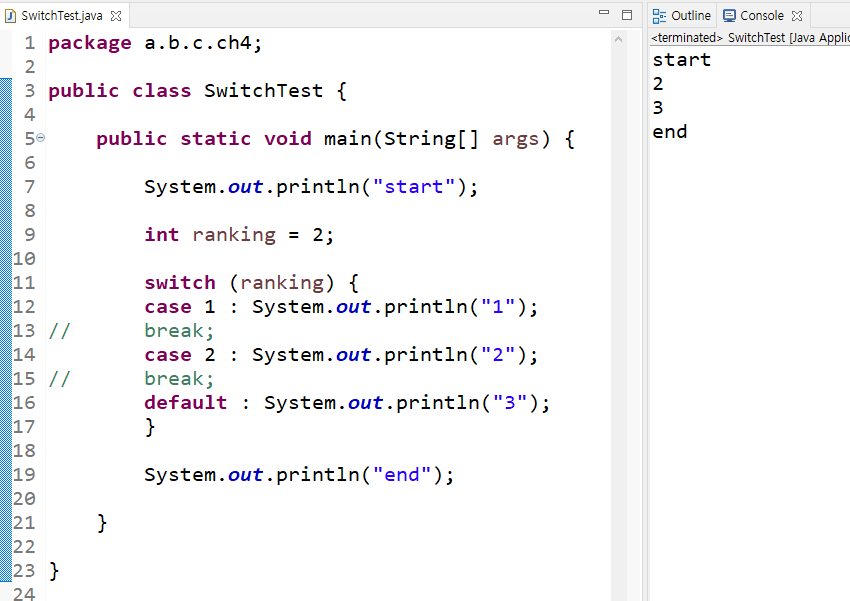
* case문장마다 break로 닫아주지 않으면 조건에 맞는 결과 아래의 문장이 전부 실행된다.
for문 복습 예제)

!!배열을 쪼개서 사용할 줄 알아야한다!!
문제1) 알파벳 대문자 26개, 알파벳 소문자 26개, 숫자 0 1 2 3 4 5 6 7 8 9, 연산자 + - * /, 특수기호 ! @ # $ % ^ & * ( ) ~ 를 각각 함수로 만들어서 콘솔에 문자 및 16진수를 출력하시오.
방법1)
package a.b.c.ch4;

public class Test_CharToHex {

	// 대문자 출력
	public static void alMethod(String aL) {
		System.out.println("Test_CharToHex.alMethod() 함수 시작 >>> : ");
		System.out.println("aL >>> : " + aL);

		if (aL != null && aL.length() > 0) {
			for (int i=0; i< aL.length(); i++) {
				char alC = aL.charAt(i);
				System.out.print(" " + alC + " : ");
				System.out.println("0x" + Integer.toHexString(alC));
			}
		}
		System.out.println("Test_CharToHex.alMethod() 함수 종료 >>> : ");
		System.out.println("=======================================");
	}

	// 소문자 출력
	public static void aSMethod(String aS) {
		System.out.println("Test_CharToHex.aSMethod() 함수 시작 >>> : ");
		System.out.println("aS >>> : " +aS);

		if(aS != null && aS.length() >0 ) {
			for (int i=0; i<aS.length(); i++) {
				char alS = aS.charAt(i);
				System.out.print(" " + alS + " : ");
				System.out.println("0x" + Integer.toHexString(alS));
			}
		}
		System.out.println("Test_CharToHex.aSMethod() 함수 종료 >>> : ");
		System.out.println("=======================================");
	}

	// 숫자 출력
	public static void numMethod(String num) {
		System.out.println("Test_CharToHex.numMethod() 함수 시작 >>> : ");
		System.out.println("num >>> : " + num);

		if (num!=null && num.length()>0) {
			for (int i=0; i<num.length(); i++ ) {
			char numC = num.charAt(i);
			System.out.print(" " + numC + " : ");
			System.out.println("0x" + Integer.toHexString(numC));

			}
		}
		System.out.println("Test_CharToHex.numMethod() 함수 종료 >>> : ");
		System.out.println("=======================================");
	}


		// 사칙연산자 출력
	public static void operMethod(String oper) {
		System.out.println("Test_CharToHex.operMethod() 함수 시작 >>> : ");
		if(oper != null && oper.length()>0) {
			for (int i=0; i<oper.length(); i++) {
				char operA = oper.charAt(i);
				System.out.print(" " + operA + " : ");
				System.out.println("0x" + Integer.toHexString(operA));
			}
		}

		System.out.println("Test_CharToHex.operMethod() 함수 종료 >>> : ");
		System.out.println("=======================================");
	}

		// 특수기호 출력
	public static void ksxMethod(String ksx) {
		System.out.println("Test_CharToHex.ksxMethod() 함수 시작 >>> : ");
		if(ksx != null && ksx.length()>0) {
			for (int i=0; i<ksx.length(); i++) {
				char ksxX = ksx.charAt(i);
				System.out.print(" " + ksxX + " : ");
				System.out.println("0x" + Integer.toHexString(ksxX));
			}
		}
		System.out.println("Test_CharToHex.ksxMethod() 함수 종료 >>> : ");
	}

	//main함수 시작
	public static void main(String[] args) {
		System.out.println("Test_CharToHex.main() 함수 시작 >>> : ");

		//변수선언
		String aL = "ABCDEFGHIJKLMNOPQRSTUVWXYZ";
		String aS = aL.toLowerCase();
		String num = "0123456789";
		String oper = "+-*/";
		String ksx = "!@#$%^&*()~";

		Test_CharToHex.alMethod(aL);
		Test_CharToHex.aSMethod(aS);
		Test_CharToHex.numMethod(num);
		Test_CharToHex.operMethod(oper);
		Test_CharToHex.ksxMethod(ksx);

		System.out.println("Test_CharToHex.main() 함수 끝 >>> : ");
			}
}
방법2) 방법1에서 중복되는 구역(프린터역할)을 함수로 묶고 scanner로 입력값을 받는다.
package a.b.c.ch4;

import java.util.Scanner;

public class Test_CharToHex_1 {

	// 영문자 대문자
	public static void alMethod(String aL) {
		System.out.println(" Test_CharToHex_1.alMethod() 함수 시작 >>> : ");
		System.out.println(" aL >>> : " + aL);

		if (aL !=null && aL.length() > 0) {
			Test_CharToHex_1.toHex_print(aL);
		}

		System.out.println("  Test_CharToHex_1.alMethod() 함수 끝 >>> : ");
	}

	// 영문자 소문자
	public static void aSMethod(String aS) {
		System.out.println(" Test_CharToHex_1.aSMethod() 함수 시작 >>> : ");
		System.out.println(" aL >>> : " + aS);

		if (aS !=null && aS.length() > 0) {
			Test_CharToHex_1.toHex_print(aS);
		}

		System.out.println("  Test_CharToHex_1.aSMethod() 함수 끝 >>> : ");
	}

	// 숫자
	public static void numMethod(String num) {
		System.out.println(" Test_CharToHex_1.numMethod() 함수 시작 >>> : ");
		System.out.println(" num >>> : " + num);

		if (num !=null && num.length() > 0) {
			Test_CharToHex_1.toHex_print(num);
		}

		System.out.println("  Test_CharToHex_1.numMethod() 함수 끝 >>> : ");
	}

	// 사칙 연산자
	public static void operMethod(String oper) {
		System.out.println(" Test_CharToHex_1.oper() 함수 시작 >>> : ");
		System.out.println(" aL >>> : " + oper);

		if (oper !=null && oper.length() > 0) {
			Test_CharToHex_1.toHex_print(oper);
		}

		System.out.println("  Test_CharToHex_1.oper() 함수 끝 >>> : ");
	}

	// 특수기호
	public static void ksxMethod(String ksx) {
		System.out.println(" Test_CharToHex_1.ksxMethod() 함수 시작 >>> : ");
		System.out.println(" ksx >>> : " + ksx);

		if (ksx !=null && ksx.length() > 0) {
			Test_CharToHex_1.toHex_print(ksx);
		}

		System.out.println("  Test_CharToHex_1.ksxMethod() 함수 끝 >>> : ");
	}

	//프린터역할
	public static void toHex_print(String h) {
		for (int i=0; i<h.length(); i++) {
		char hHex = h.charAt(i);
		System.out.print(" " + hHex + " : ");
		System.out.println("0x" + Integer.toHexString(hHex));
		}
	}

	public static void main(String[] args) {
		System.out.println("Test_CharToHex_1.main() 함수 시작 >>> : ");

		// 변수 선언
		String aL = "ABCDEFGHIJKLMNOPQRSTUVWXYZ";
		String aS = aL.toLowerCase();
		String num = "0123456789";
		String oper = "+-*/";
		String ksx = "!@#$%^&*()~";

		System.out.println("ASCII CODE 보기 >>> : ");
		System.out.println("1 : 영문자 대문자 ");
		System.out.println("2 : 영문자 소문자 ");
		System.out.println("3 : 숫자");
		System.out.println("4 : 사칙연산자");
		System.out.println("5 : 특수기호 !@#$%^&*()~");

		Scanner sc = new Scanner(System.in);
		int sNum = sc.nextInt();

		switch (sNum) {
		case 1 : Test_CharToHex_1.alMethod(aL);
			break;
		case 2 : Test_CharToHex_1.aSMethod(aS);
			break;
		case 3 : Test_CharToHex_1.numMethod(num);
			break;
		case 4 : Test_CharToHex_1.operMethod(oper);
			break;
		case 5 : Test_CharToHex_1.ksxMethod(ksx);
			break;
		default :
			System.out.println("1~5중 하나를 선택 하세요!");
		} //end of switch

		System.out.println("Test_CharToHex_1.main() 함수 끝 >>> : ");
		sc.close();
	}

}
방법3) 방법2에서 scanner를 함수로 만들고 main에서는 호출하는 방법으로 쓸 수도 있다.
package a.b.c.ch4;

import java.util.Scanner;

public class Test_CharToHex_2 {

	// scanner
	public void testM(String aL, String aS, String num, String oper, String ksx) {

		System.out.println("ASCII CODE 보기 >>> : ");
		System.out.println("1 : 영문자 대문자 ");
		System.out.println("2 : 영문자 소문자 ");
		System.out.println("3 : 숫자");
		System.out.println("4 : 사칙연산자");
		System.out.println("5 : 특수기호 !@#$%^&*()~");

		Scanner sc = new Scanner(System.in);
		int sNum = 0;

		switch (sNum) {
		case 1 : Test_CharToHex_2.alMethod(aL);
			break;
		case 2 : Test_CharToHex_2.aSMethod(aS);
			break;
		case 3 : Test_CharToHex_2.numMethod(num);
			break;
		case 4 : Test_CharToHex_2.operMethod(oper);
			break;
		case 5 : Test_CharToHex_2.ksxMethod(ksx);
			break;
		default :
			System.out.println("1~5중 하나를 선택 하세요!");
		} //end of switch


		sc.close();
	}


	// 영문자 대문자
	public static void alMethod(String aL) {
		System.out.println(" Test_CharToHex_1.alMethod() 함수 시작 >>> : ");
		System.out.println(" aL >>> : " + aL);

		if (aL !=null && aL.length() > 0) {
			Test_CharToHex_1.toHex_print(aL);
		}

		System.out.println("  Test_CharToHex_1.alMethod() 함수 끝 >>> : ");
	}

	// 영문자 소문자
	public static void aSMethod(String aS) {
		System.out.println(" Test_CharToHex_1.aSMethod() 함수 시작 >>> : ");
		System.out.println(" aL >>> : " + aS);

		if (aS !=null && aS.length() > 0) {
			Test_CharToHex_1.toHex_print(aS);
		}

		System.out.println("  Test_CharToHex_1.aSMethod() 함수 끝 >>> : ");
	}

	// 숫자
	public static void numMethod(String num) {
		System.out.println(" Test_CharToHex_1.numMethod() 함수 시작 >>> : ");
		System.out.println(" num >>> : " + num);

		if (num !=null && num.length() > 0) {
			Test_CharToHex_1.toHex_print(num);
		}

		System.out.println("  Test_CharToHex_1.numMethod() 함수 끝 >>> : ");
	}

	// 사칙 연산자
	public static void operMethod(String oper) {
		System.out.println(" Test_CharToHex_1.oper() 함수 시작 >>> : ");
		System.out.println(" aL >>> : " + oper);

		if (oper !=null && oper.length() > 0) {
			Test_CharToHex_1.toHex_print(oper);
		}

		System.out.println("  Test_CharToHex_1.oper() 함수 끝 >>> : ");
	}

	// 특수기호
	public static void ksxMethod(String ksx) {
		System.out.println(" Test_CharToHex_1.ksxMethod() 함수 시작 >>> : ");
		System.out.println(" ksx >>> : " + ksx);

		if (ksx !=null && ksx.length() > 0) {
			Test_CharToHex_1.toHex_print(ksx);
		}

		System.out.println("  Test_CharToHex_1.ksxMethod() 함수 끝 >>> : ");
	}


	//프린터역할
	public static void toHex_print(String h) {
		for (int i=0; i<h.length(); i++) {
		char hHex = h.charAt(i);
		System.out.print(" " + hHex + " : ");
		System.out.println("0x" + Integer.toHexString(hHex));
		}
	}

	public static void main(String[] args) {
		System.out.println("Test_CharToHex_1.main() 함수 시작 >>> : ");

		// 변수 선언
		String aL = "ABCDEFGHIJKLMNOPQRSTUVWXYZ";
		String aS = aL.toLowerCase();
		String num = "0123456789";
		String oper = "+-*/";
		String ksx = "!@#$%^&*()~";

		//Scanner함수를 불러온다.
		Test_CharToHex_2 tc_2 = new Test_CharToHex_2();
		tc_2.testM(aL, aS, num, oper, ksx);

		System.out.println("Test_CharToHex_1.main() 함수 끝 >>> : ");

	}

}
예제) 나머지를 사용하여 값 개수세기
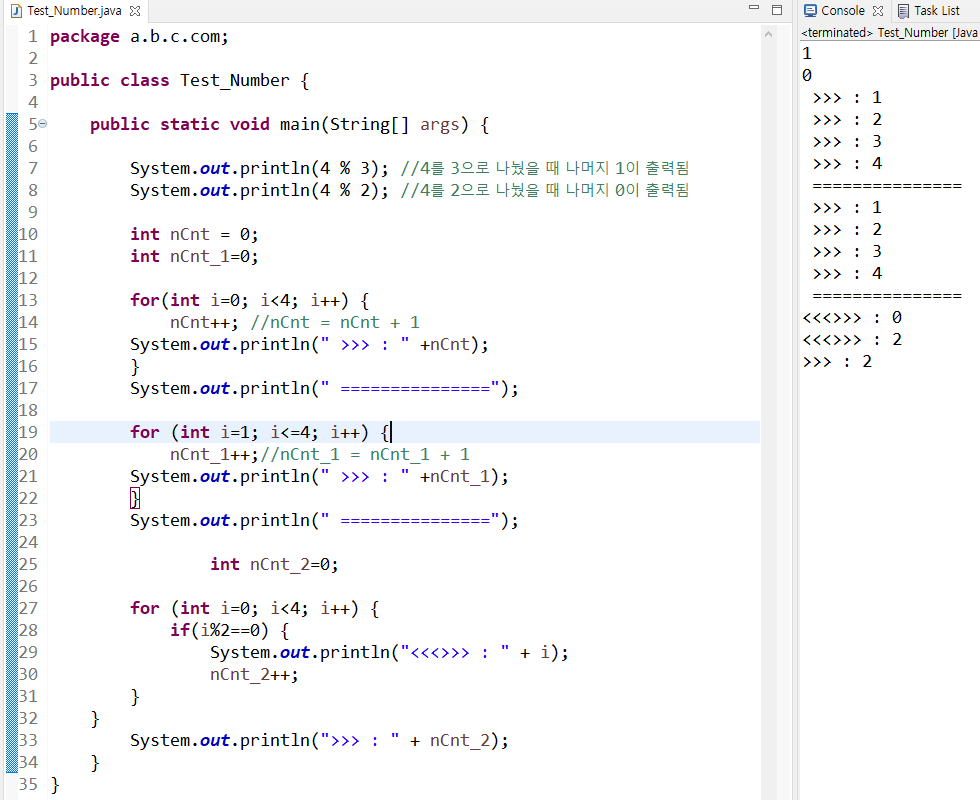
문제2) sVar 문자열에 있는 문자 중 D의 개수를 출력하시오.
- 풀이방법
- 자바에서 문자열은 문자의 배열이다.
- 배열은 개수가 있다.
- 자바에서 문자열의 길이 구하는 함수 : length()함수
- 자바에서 문자열에서 문자를 추출하는 함수 : charAt(int index)
- 문자는 ==(상등연산자)로 비교할 수 있다
- 문자 비교를 ‘D’’로 할지 십진수로할지 16진수로 할지 결정하기 (16진수로 바꾸기)
- 문자가 같으면 카운트 증가 ++(증감연산자)로 한다.

문제3) 짝수 even, 홀수 odd의 개수를 출력하시오.
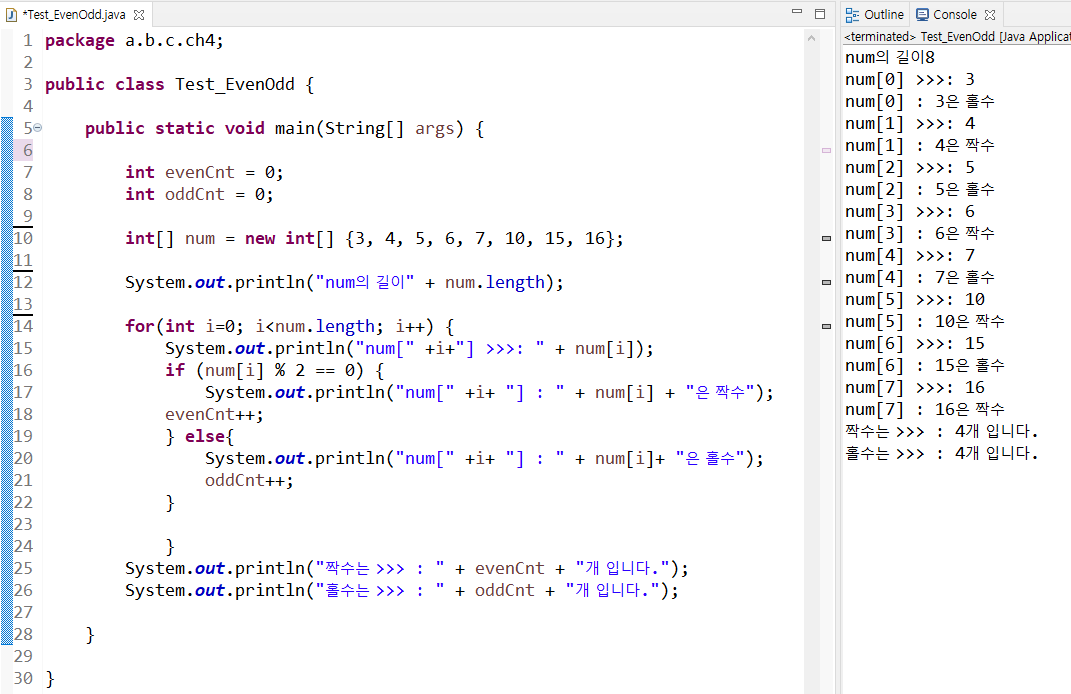
** 내가쓰는 변수를 사용하고 참조할 줄 알아야한다!!
**변수할당을 어떻게 할지
728x90
반응형
'JAVA > 강의노트' 카테고리의 다른 글
| JAVA 16일차. 추상클래스, this(), 정보은닉 (9) | 2022.08.24 |
|---|---|
| JAVA 15일차. 상속과 인터페이스 (11) | 2022.08.22 |
| JAVA 13일차. switch문, for문, while문, do-while문 (20) | 2022.08.20 |
| JAVA 12일차. 비교연산자(equals함수), scanner 클래스, if문 (10) | 2022.08.19 |
| JAVA 11일차. 조건문(if문), 배열함수 (6) | 2022.08.17 |
'JAVA/강의노트' Related Articles
more


